
Every request lands somewhere. And stays there until it is done.

Nexus is the operations layer for a small property portfolio. Tenants report, dispatch assigns, technicians work from their phones with or without signal — and the log they leave behind becomes the invoice.

14 days free, every feature included. A card is saved when you pick a plan and is not charged until the trial ends.

One request, start to finish

The states a job really moves through — the words on the board, not a marketing diagram.

  1. OpenA tenant files it against their unit, or you file it for them. Category, priority, and a photo of what went wrong.
  2. DispatchedThe queue is ordered by what will hurt most if it is missed — unassigned work first, then emergencies, oldest before newest. Put a name on it.
  3. In ProgressThe technician works from their phone, logs the minutes, and photographs what they found. No signal needed.
  4. BlockedWaiting on a part, or on access to the unit? It says so, with the reason, instead of going quiet for three days.
  5. ResolvedClosed with the work log attached: what was done, who did it, how long it took.
  6. InvoicedThat log becomes a draft invoice. Send it, mark it paid, or print it for the owner.

The same three claims, on screen

Captured from the running app, not drawn. The company is a demonstration one — the software is the software you get.
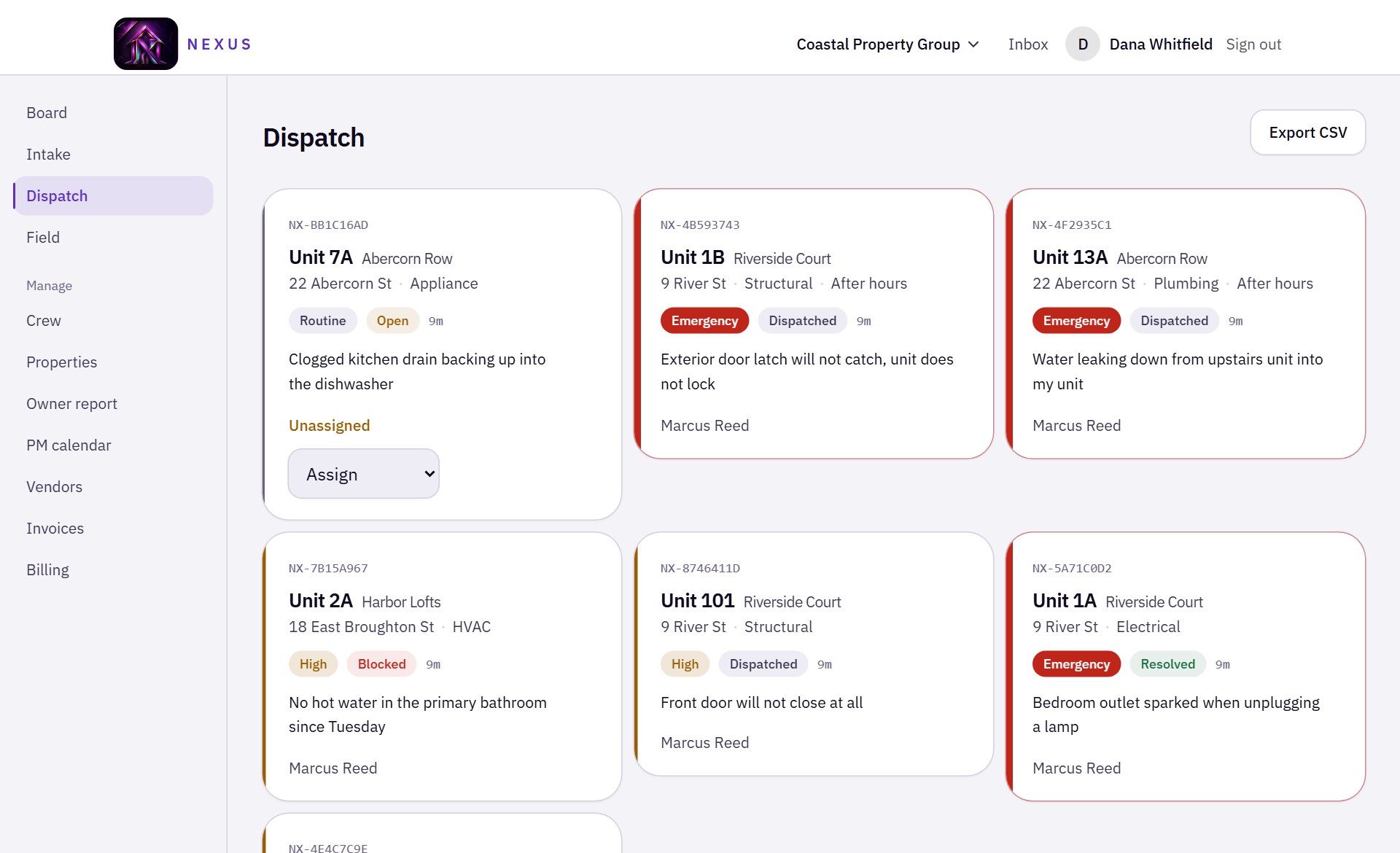
The Nexus dispatch board: six maintenance requests as cards, each showing its reference, unit, address, category, priority and status. The first is unassigned with an assign control; two are marked Emergency.

Every request lands somewhere

The queue a dispatcher actually works from. Unassigned first, then emergencies, oldest before newest — the order is the product, not a setting somebody has to remember to apply.
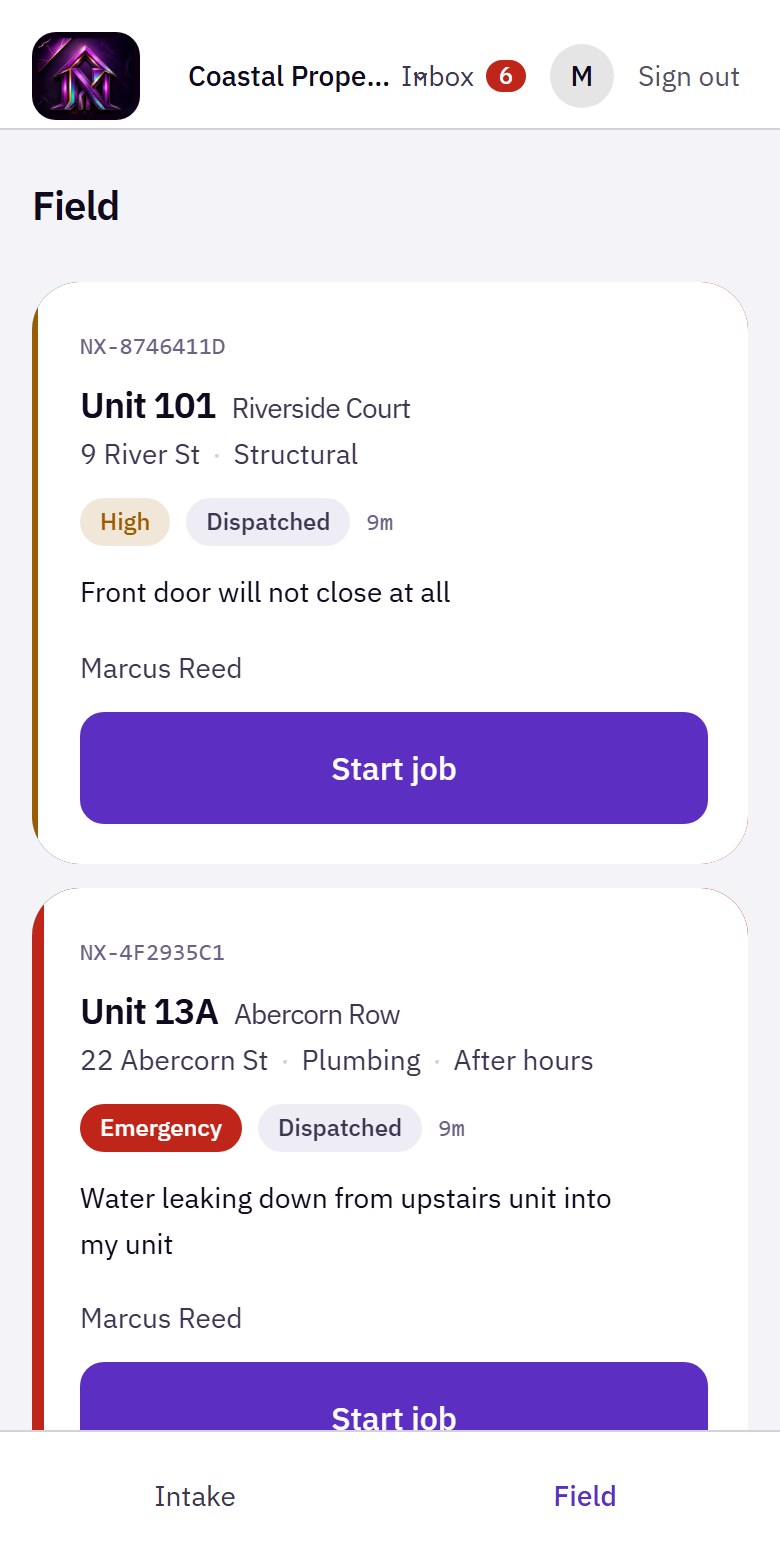
The Nexus field view on a phone: two assigned jobs, each with its unit, address, priority and a full-width Start job button.

The technician works from their phone

Their own jobs, nothing else, one thumb. Status changes and photos taken with no signal wait on the device and send themselves when it comes back.
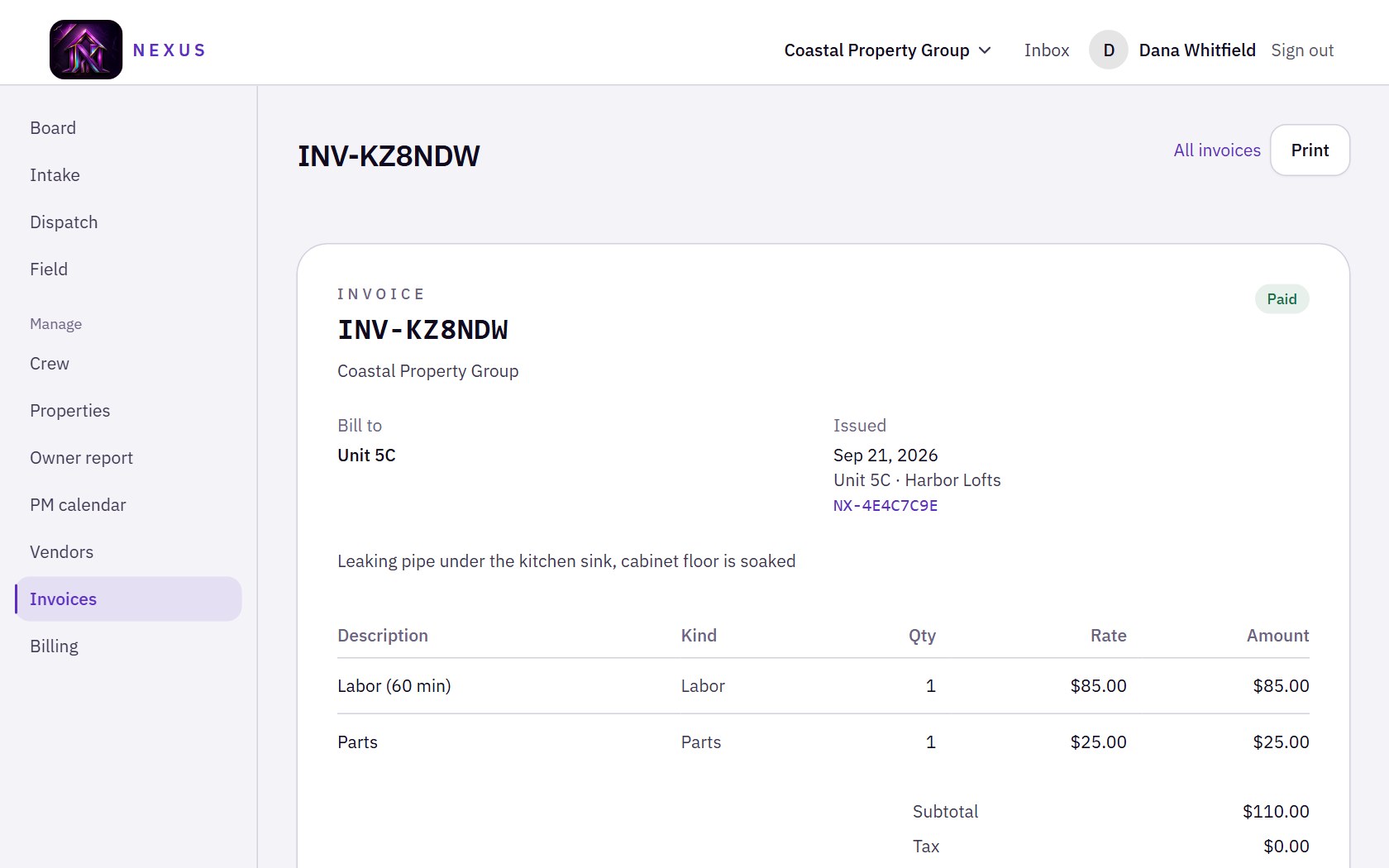
A Nexus invoice: line items for 60 minutes of labour and parts with rates and a subtotal, billed to a unit, linked back to the ticket it was drafted from.

The work log becomes the invoice

Labour at the minutes logged on site, parts, and a link back to the request it came from. Nobody retypes anything, and the owner can see what they are paying for.

Four people, four different apps

Everyone signs into the same place and gets only their own work. The split is enforced on the server, not hidden in the interface.

Manager
The whole operation — board, properties, crew, vendors, invoices and billing.
Dispatch
The queue and the crew. Assigns work without touching billing or company settings.
Field
Their own jobs and nothing else. Built for one hand on a phone, works with no signal.
Tenant
Files for their own unit and follows that request. Never sees another unit's business.

What it does

Intake and triage

  • Requests filed against a specific unit, not a vague address
  • Category, priority and an after-hours flag on every request
  • Photos from the person reporting it, compressed on the device

Dispatch

  • A queue ordered by urgency, not by arrival time
  • Assign to a technician by trade
  • Export the board to CSV when someone wants a spreadsheet

In the field

  • A phone-first job list with swipe actions
  • Status changes and photos survive a dead zone and send on reconnect
  • Time on site logged as the work happens
  • A blocked job carries its reason, so nobody has to ask

Planned work and vendors

  • A preventive maintenance calendar per property
  • Work orders raised against outside contractors
  • Vendor names carried onto the invoice for the job they served

The paperwork

  • Invoices drafted from the work log, not retyped from it
  • An owner report that prints as a document you can hand over
  • Every request keeps its full history: status, notes, time and photos

Running the company

  • Crew and tenants join with a code — no seat admin
  • Several companies under one login
  • Installs to a phone's home screen like an app

Priced by doors, not by seats

One price for the whole company. Add every manager, dispatcher, technician and tenant you need — what you pay depends on how many units you look after, which is the only number that tracks the work.

Starter

A single building or a small book of doors.

$29/ month

Up to 15 units

  • Tickets, dispatch and the field app
  • Photos from the crew
  • Invoices from the work log
Start with Starter

Growth

A growing book of business.

$69/ month

Up to 40 units

  • Everything in Starter
  • Preventive maintenance
  • Vendor work orders
Start with Growth

Professional

Several properties and a crew to run them.

$169/ month

Up to 125 units

  • Everything in Growth
  • Owner reporting
  • Multiple companies under one login
Start with Professional

Portfolio

A full portfolio, and the people to run it.

$449/ month

Up to 500 units

  • Everything in Professional
  • Priority support
Start with Portfolio

Every plan starts with 14 days free and includes the full product — nothing is held back to sell you later. Move up or down a plan whenever your door count changes. Looking after more than 500 units? That is a conversation rather than a checkbox — tell us about your portfolio.

The questions that come after the price

Getting your doors in
Import the rent roll you already have — CSV, TSV or a spreadsheet (.xlsx, .xlsm, .ods) — or paste it straight in. You see every property and unit it will create, and what it will skip, before anything is written.
When there is no signal
A status change or a photo taken in a basement is kept on the device and sent when the phone reconnects. Anything that cannot be saved says so instead of looking saved, because a technician needs to know the tap did not land.
Who can see what
Each company's records are scoped to that company on the server, not hidden in the interface. A tenant reaches their own unit and nothing else. The board exports to CSV whenever you want it in a spreadsheet.
Changing your mind
Cancel from the Billing page, through Stripe's own portal. The card you save when you pick a plan is not charged until the 14 days are up, and moving down a plan is the same two clicks as moving up.
Getting hold of us
The contact page reaches a person, before or after you sign up. We have not put a response time on that, because we would rather answer you than manage a number.

Something here not answered? Ask us directly.

Set it up this afternoon

Add a building, add its units, share the join code with your crew. The first request can be filed before you finish your coffee.

Start your 14-day trial